Vícejazyčný web

WPML Multilingual CMS
http://wpml.org/

Jednoznačný mercedes mezi jazykovými pluginy, opakovaně osvědčený (např. na Jetíkovi a Novatopu

Multilingual WordPress

WPML makes multilingual content management easy, just like running a site in one language.

Multilingual Features

– Turns a single WordPress install into a multilingual site.
– Built-in theme localization without .mo files.
– Comments translation allows you to moderate and reply to comments in your own language.
– Professional translation, connecting expert translators with site owners (optional, you can translate yourself for free).

CMS Navigation Features

– Includes CMS navigation elements for drop down menus, breadcrumbs trail and sidebar navigation.
– Robust links to posts and pages that never break.

Architecture (for geeks)

– Translations are grouped together and not mixed in the database.
– CMS navigation elements provide accurate and easy to use site-wide navigation.
– Simple CSS for easy customization. Try WPML’s CSS customization tool

!!! Při potřebě přebírat stávající obsah (custom fields, galerie) popis řešení zde .

*Alternativy:*

Polylang
http://wordpress.org/extend/plugins/polylang/

You write posts, pages and create categories and post tags as usual, and then define the language for each of them. The translation is optional. You can have as many languages as you want. You can translate posts, pages, media, categories, post tags, menus, widgets… Custom post types, custom taxonomies, sticky posts and post formats, RSS feeds and all default WordPress widgets are supported.

How to use »

xLanguage
http://wordpress.org/extend/plugins/xlanguage/

xLanguage is a full featured plugin allows you to blog in different language, and allows user to select which version to read. It works for blog post, page, tags, categories. The user language preferences will also select the right theme and plugins MO files.

Customization is the No. 1 design goal, after all that’s probably the reason why you want to setup a multilingual blog. The language configuration combination is highly customizable to facilitate multiple fallbacks. Every UI is extracted out, which could be optionally overridden by theme design without touching the plugin file at all.

qTranslate
http://wordpress.org/extend/plugins/qtranslate/
http://www.qianqin.de/qtranslate/

qTranslate supports infinite languages, which can be easily added/modified/deleted via the comfortable Configuration Page. All you need to do is activate the plugin and start writing the content!
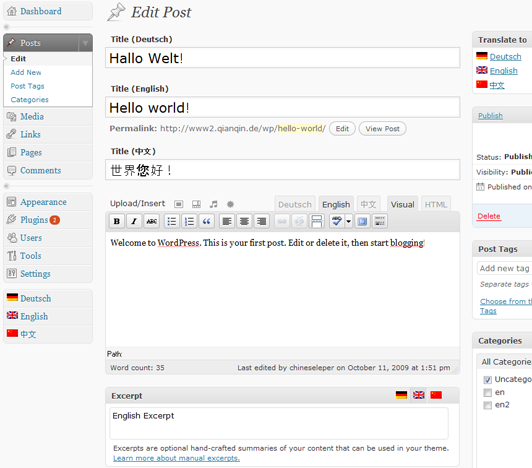
qTranslate Plus
https://wordpress.org/plugins/qtranslate-xp/

qTranslate Plus is an unOfficial modified version of qTranslate (created by Qian Qin) created to be compatible with WordPress 3.9 or highter.

ZdMultiLang
http://wordpress.org/extend/plugins/zdmultilang/

– Translate posts ang pages
– Translate categories and tags
– Switch blog language
– Widget to change currently viewed language

Bogo
http://wordpress.org/extend/plugins/bogo/
http://ideasilo.wordpress.com/bogo/

Bogo is a straight-forward multilingual plugin for WordPress.
Assigns one language per post. Bogo does not create any additional custom table on your database, unlike some other plugins in this category. This design makes Bogo a solid, reliable and conflict-free multilingual plugin.

For custom post types add to function.php


function my_localizable_post_types($localizable) {
$localizable = array('post', 'page', 'mycustom_post');
return $localizable;
}
add_filter('bogo_localizable_post_types', 'my_localizable_post_types', 10, 1);

For your own language switcher in header.php:


$uri = $_SERVER["REQUEST_URI"];
$uri_array = split("/", $uri);
$uri_first = $uri_array[1];
$odkaz = ($uri_first == 'en') ? '<a href="..." title="Česky"><img src="cs.png"></a>' : '<a href="..." title="English"><img src="en.png"></a>';
echo $odkaz;

Transposh
http://wordpress.org/plugins/transposh-translation-filter-for-wordpress/

Transposh translation filter for WordPress offers a unique approach to blog translation. It allows your blog to combine automatic translation with human translation aided by your users with an easy to use in-context interface.

xili-language
https://wordpress.org/plugins/xili-language/

xili-language provides for a bilingual (or multilingual) website an automatic selection of language (.mo) in theme according to the language of current post(s) or page. Theme’s behaviour can be fully personalized through settings, hooks and api.

Multisite Language Switcher
https://wordpress.org/plugins/multisite-language-switcher/

A simple, powerful and easy to use plugin that will add multilingual support to a WordPress multisite installation, i.e. multiple subdomains or folders (if you need to set up multiple sites across multiple domains, you’ll also want to use the WordPress MU Domain Mapping plugin as well – as long as the domains are all hosted on the same server).

Kontaktní formulář, formulářové pluginy

Contact Form 7
http://wordpress.org/extend/plugins/contact-form-7/
http://contactform7.com/

Contact Form 7 can manage multiple contact forms, plus you can customize the form and the mail contents flexibly with simple markup. The form supports Ajax-powered submitting, CAPTCHA, control question, Akismet spam filtering and so on.
Můžete založit třeba sto různých formulářů se stovkou různých obsahů. Takže například jeden bude obsahovat textová pole a rozjížděcí menu, jiný zase check buttony a potvrzovací tlačítka nebo všechno dohromady. Uděláte si takový formulář, jaký budete chtít. Čeština k dispozici.

Optimize and style Contact Form 7

How To Customize The Style Of Contact Form 7 To Match Your Website »

Stylování Contact Form 7 do podoby ElegantThemes Contact Form »

Přidání funkcí onfocus a onblur

Contact Form 7 to Database Extension
http://wordpress.org/extend/plugins/contact-form-7-to-database-extension/

Changing Form Data Before it is Saved »

Saves form submissions to the database that come from Contact Form 7.

*Alternative*

Save Contact Form 7
https://wordpress.org/plugins/save-contact-form-7/

Save Contact Form 7 data. Sort, search & export it in CSV+PDF. Unlike CFDB, the plugin itself is very smart and creates column name from your Contact Form 7 Field names.

Jquery Validation For Contact Form 7
https://wordpress.org/plugins/jquery-validation-for-contact-form-7/

This plugin adds jquery validation to your contact form 7. You will be able to validate extra validation rules like: url, date, credit card, phone number in the contact form 7 fields.

Frontend Registration – Contact Form 7

Frontend Registration – Contact Form 7

By using this plugin you can create front-end registration form by which registered user will be register as a subscriber role in WordPress.

Contact Form 7 MailChimp Extension
https://wordpress.org/plugins/contact-form-7-mailchimp-extension/
Simple way to integrate MailChimp mailing lists to Contact Form 7. Save your subscribers in a proper mailing list.

Contact Form 7 – Success Page Redirects
https://wordpress.org/plugins/contact-form-7-success-page-redirects/
An add-on for Contact Form 7 that provides a straightforward method to redirect visitors to success pages or thank you pages.

Contact Form 7 Modules
http://wordpress.org/plugins/contact-form-7-modules/
Add useful modules such as hidden fields and „send all fields“ to the Contact Form 7 plugin. You can also choose to have the value of the hidden field dynamically populated in your form when you are contacted.

Contact Form 7 Select Box Editor Button
https://wordpress.org/plugins/contact-form-7-select-box-editor-button/screenshots/
Add a contact form link into article text. For contact forms where the recipient can be chosen in a select box.

Contact Form 7 Dynamic Text Extension
http://wordpress.org/plugins/contact-form-7-dynamic-text-extension/

CF7 DTX lets you create pre-populated fields based on other values. Some examples might include:

– Auto-filling a URL
– Auto-filling a Post ID, title, or slug
– Pre-populating a Product Number
– Referencing other content on the site
– Populating with post info
– Populating with user info
– Populating with custom fields
– Any value you can write a shortcode for

You can also choose to have the value of the hidden field dynamically populated in your form when you are contacted.

Další nastavení (Bcc:, Google Analytics) »

Manipulace s údaji v Contact Form 7 před a po odeslání »

Honeypot Module for Contact Form 7 WordPress Plugin »

Fórum podpory »

Configuring Contact Form 7 to Work Perfectly With a Twentyten Child Theme »

Když máte problém s odesíláním »
Další rady, co dělat při selhání »

FAQ »

*Alternativy:*

Caldera Forms – Drag and drop responsive WordPress form builder
https://wordpress.org/plugins/caldera-forms/

Caldera Forms‘ visual editor simplifies form building for WordPress. Set up your form with multiple columns, add additional pages, and funnel user responses with conditional logic to get more robust data and relevant information from your customers and site visitors. Anti-spam, AJAX, notification emails, and database entry tracking are enabled by default.

*Visual Form Builder*
https://wordpress.org/plugins/visual-form-builder/

A plugin that allows you to build and manage all kinds of forms for your website in a single place. Drag-and-drop reordering, automatically stores form entries in your WordPress database, manage form entries in the WordPress dashboard, export entries to a CSV file, send form submissions to multiple emails, jQuery Form Validation.

Intouch
http://wordpress.org/extend/plugins/intouch/
http://adahas.com/work/intouch/

This is a plugin for WordPress which allows you to insert a custom build contact form, which on submission will send the information via email.
Features
* Customizable contact form with variable number of fields.
* Ability to specify mandatory fields.
* Can forwarded to any email address.
* Instant insertion using the Quicktag.
* Complete customization from admin panel.
* Instant submission using AJAX (for JavaScript supported browsers), and minimum overhead.
* Fall-back to standard HTML form submission, if JavaScript is not supported.
* Conforms to XHTML 1.0 Strict / XHTML 1.1
* Compatible to be served as application/xhtml+xml

cforms II
http://www.deliciousdays.com/cforms-plugin

cforms is a plugin for WordPress, offering convenient deployment of multiple contact forms throughout your blog or even on the same page. The form submission utilizes AJAX, falls back, however, to a standard method in case AJAX/Javascript is not supported or disabled.

Fast Secure Contact Form
http://wordpress.org/extend/plugins/si-contact-form/

This plugin allows a webmaster to easily create and add contact forms to WordPress. The contact form will let the user send emails to a site’s admin, and also send a meeting request to talk over phone or video. An administration panel is present, where the webmaster can create and preview unlimited forms.

Features a super easy admin panel, multi-form feature, autoresponder, no templates to mess with, and an option to redirect visitors to any URL after the message is sent. Includes CAPTCHA and Akismet support to block all common spammer tactics. Spam is no longer a problem. You can add extra fields of any type: text, textarea, checkbox, checkbox-multiple, radio, select, select-multiple, attachment, date, time, hidden, password, and fieldset.

Formidable Forms
http://wordpress.org/plugins/formidable/

Quickly and easily build forms with a simple drag-and-drop interface and in-place editing. There are dozens of form-building plugins out there to create forms, but most are confusing and overly complicated. With Formidable, it is easy to create forms within a simple drag-and-drop interface.

Přehled pluginů pro kontaktní formuláře »

Snadné vložení odkazu v příspěvku na jiný příspěvek

Jestliže často potřebujete v rámci jednoho příspěvku odkázat na jiný příspěvek na webu a nechce se vám odkazovaný příspěvek pokaždé komplikovaně hledat, pak nepochybně oceníte plugin Link to Post. Plugin Link to Post přidá do editoru příspěvku tlačítko (Link to post) umožňující vyhledat na webu daný článek, stránku, kategorii, ba i štítek (tag) a vložit […]

Prohledávání webu

Relevanssi
http://wordpress.org/extend/plugins/relevanssi/
http://www.mikkosaari.fi/relevanssi/

Náhrada standardního vyhledávání.

Relevanssi replaces the basic WordPress search with a partial-match search that sorts the results based on relevance. It is a partial match search, so if user inputs several search terms, the search will find all documents that match even one term, ranking highest those documents that match all search terms.

Relevanssi does some fuzzy matching too, so if user searches for something that doesn’t produce any results, Relevanssi will look for similar terms. Strict phrases using quotation marks (like „search phrase“) are supported.

The matching is based on basic tf * idf weighing, with some extra features added like a boost for words that appear in titles.

Relevanssi can create custom search result snippets that show the part of the document where the search hit was made. Relevanssi can also highlight the query terms in the search results.

Relevanssi can keep a log of user queries and display both most popular queries and recent queries that got no hits.

Relevanssi supports the hidden input field cat to restrict searches to certain categories (or tags, since those are pretty much the same). Just add a hidden input field named cat in your search form and list the desired category or tag IDs in the value field – positive numbers include those categories and tags, negative numbers exclude them. You can also set the restriction from general plugin settings (and then override it in individual search forms with the special field).

In addition of post and page content (including tags and categories), Relevanssi can index comments and pingbacks. It can also expand shortcodes in post content before indexing, so that everything the user sees on the entry page will be included in the index.

*Alternativy*

Dave’s WordPress Live Search
https://wordpress.org/plugins/daves-wordpress-live-search/

Adds „live search“ functionality to your WordPress site. Uses the built-in search and jQuery.

Better Search
https://wordpress.org/plugins/better-search/

Better Search replaces the default WordPress search with a better search that gives contextual results sorted by relevance.

Pohodlnější stránkování

WP-PageNavi
http://wordpress.org/extend/plugins/wp-pagenavi/
http://lesterchan.net/wordpress/readme/wp-pagenavi.html

Přidá přehledné a pohodlné stránkování, které se dá různým způsobem nastavovat.

Implementováno na tomto webu, ve *style-Default.css* jsou doplněny styly pro šablonu „PureType“:209


.wp-pagenavi { margin: 15px 0px 15px 0px; }
.wp-pagenavi a, .wp-pagenavi a:link { padding: 5px 7px; margin: 2px; text-decoration: none; border: 1px solid #e1e1c8; color: #413f36; background-color: #eeeedd; }
.wp-pagenavi a:visited { padding: 5px 7px; margin: 2px; text-decoration: none; border: 1px solid #e1e1c8; color: #413f36; background-color: #eeeedd; }
.wp-pagenavi a:hover { border: 1px solid #608e7a; color: #FFF; background-color: #7bab96; }
.wp-pagenavi a:active { padding: 5px 7px; margin: 2px; text-decoration: none; border: 1px solid #e1e1c8; color: #413f36; background-color: #eeeedd; }
.wp-pagenavi span.pages { padding: 5px 7px; margin: 2px 2px 2px 2px; color: #000000; border: 1px solid #e1e1c8; color: #413f36; background-color: #eeeedd; }
.wp-pagenavi span.current { padding: 5px 7px; margin: 2px; font-weight: bold; border: 1px solid #608e7a; color: #FFF; background-color: #7bab96; }
.wp-pagenavi span.extend { padding: 5px 7px; margin: 2px; border: 1px solid #608e7a; color: #FFF; background-color: #7bab96; }

Přehled pluginů pro stránkování

Vyladění nové instalace WordPressu

Nastavení .htaccess

Zabezpeční souboru wp-config.php


<files wp-config.php>
order allow,deny
deny from all
</files>

Adresa vždy bez www


RewriteEngine on
Options +FollowSymlinks
RewriteCond %{HTTP_HOST} ^www.domena.cz
RewriteRule (.*) http://domena.cz/$1 [R=301,QSA,L]

Adresa vždy s www


RewriteEngine on
Options +FollowSymlinks
RewriteCond %{HTTP_HOST} ^domena.cz
RewriteRule (.*) http://www.domena.cz/$1 [R=301,QSA,L]

Zákaz výpisu obsahu adresářů


Options -Indexes

Odstranění „rubriky“ z url


RewriteRule ^category/(.+)$ http://www.domena.cz/$1 [R=301,L]

(ev. použijeme plugin „No category base“:45)

Robots.txt

Zákaz přístupu do adresářů WordPressu robotům a uvedení odkazu na sitemap


User-agent: *
Disallow: /cgi-bin/
Disallow: /wp-admin/
Disallow: /wp-includes/
Disallow: /wp-content/
Disallow: /trackback/
Disallow: /xmlrpc.php
Disallow: /wp-

Sitemap: http://domena.cz/sitemap.xml

Pro vytvoření sitemapy použijeme plugin „Google XML Sitemaps“:219

Nastavení „user-friendly“ odkazů

Nastavení > Trvalé odkazy > Vlastní struktura: /%postname%/

Vytvoření a odkaz na favicon

1. Vytvoříme *favicon.ico* (např. zde nebo zde
3. Zkopírujeme ho do rootu našeho blogu
2. Umístíme do hlavičky v souboru *header.php*


<link rel="shortcut icon" href="<?php bloginfo('url'); ?>/favicon.ico" />

Blocks script injections

The following code blocks script injections and any attempts to modify the PHP GLOBALS and _REQUEST variables.


Options +FollowSymLinks
RewriteEngine On
RewriteCond %{QUERY_STRING} (\<|%3C).*script.*(\>|%3E) [NC,OR]
RewriteCond %{QUERY_STRING} GLOBALS(=|\[|\%[0-9A-Z]{0,2}) [OR]
RewriteCond %{QUERY_STRING} _REQUEST(=|\[|\%[0-9A-Z]{0,2})
RewriteRule ^(.*)$ index.php [F,L]

Hot-linking protection


RewriteEngine On
#Replace ?mysite\.com/ with your blog url
RewriteCond %{HTTP_REFERER} !^http://(.+\.)?mysite\.com/ [NC]
RewriteCond %{HTTP_REFERER} !^$
#Replace /images/nohotlink.jpg with your "don't hotlink" image url
RewriteRule .*\.(jpe?g|gif|bmp|png)$ /images/nohotlink.jpg [L]

Odstranění verze WordPressu

Paste the following lines of code in the functions.php file of your theme:


function wp_remove_version() {
return '';
}
add_filter('the_generator', 'wp_remove_version');

Disable eval:

This can be done with a PHP Extension called Suhosin; the Suhosin configuration can be edited within your php.ini file.


suhosin.executor.disable_eval = On

Další doporučená nastavení souboru .htacess
6 .htaccess Tricks for Better WordPress SEO & Security

Vytvoření sitemapy

Google XML Sitemaps
http://wordpress.org/extend/plugins/google-sitemap-generator/
http://www.arnebrachhold.de/projects/wordpress-plugins/google-xml-sitemaps-generator/

This plugin will generate a special XML sitemap which will help search engines like Google, Bing, Yahoo and Ask.com to better index your blog. With such a sitemap, it’s much easier for the crawlers to see the complete structure of your site and retrieve it more efficiently. The plugin supports all kinds of WordPress generated pages as well as custom URLs. Additionally it notifies all major search engines every time you create a post about the new content.

Sitemap Generator Plugin for WordPress
http://wordpress.org/extend/plugins/sitemap-generator/
http://www.dagondesign.com/articles/sitemap-generator-plugin-for-wordpress/

This plugin creates a standard sitemap for your WordPress powered site. This is not just another XML sitemap plugin, but rather a true sitemap generator which is highly customizable from its own options page in the WordPress admin panel. Some of its features include: support for multi-level categories and pages, category/page exclusion, multiple-page generation with navigation, permalink support, choose what to display, what order to list items in, show comment counts and/or post dates, and much more.

Simply add the following line to a WordPress page (where you would like the sitemap to display):

HTML Page Sitemap
http://wordpress.org/extend/plugins/html-sitemap/

This simple plugin adds an HTML (Not XML) sitemap of your blog pages (not posts) by entering the shortcode [html-sitemap] in the page content. This simple plugin is configured from the shortcode. Settings include the sort_column, sort_order, exclude, include, depth, child_of, meta_key, meta_value, authors, number, and offset. You can set essentially everything you can set in the wp_list_pages function.

Karailiev’s sitemap
http://wordpress.org/extend/plugins/karailievs-sitemap/

This plugin adds a XML sitemap and news sitemap to your blog. It’s used to show all your pages and posts to the search engines like Google, Yahoo and MSN.

WP Realtime Sitemap
http://wordpress.org/extend/plugins/wp-realtime-sitemap/

A sitemap plugin to make it easier for your site to show all your pages, posts, archives, categories and tags in an easy to read format without any need for template modification or html/php knowledge.

– Order the output anyway you want with the use of the shortcode.
– Order the output of the Pages, Posts, Custom Post Types, Archives, Categories and Tags.
– Show/hide Pages, Posts, Custom Post Types, Archives, Categories and Tags.
– Optionally show categories and/or tags as a bullet list, or as a tag cloud.
– Exclude Pages, Posts, Custom Post Types, Categories and Tags IDs.
– Limit the amount of posts, custom post types, archives, categories and tags displayed.
– Change the archive type from the WordPress default.
– Show/hide Categories and Tags which have no posts associated to them.
– Show/hide how many posts are in each Archive, Category or Tag.
– Optionally name the sections different from the default of Pages, Posts, Archives, Categories and Tags.
– Hierarchical list of pages and categories.

Simple Wp Sitemap
https://wordpress.org/plugins/simple-wp-sitemap/screenshots/

An easy, fast and secure plugin that adds both an xml and an html sitemap to your site, which updates and maintains themselves so you don’t have to!

Pohodlnější přístup k položkám v administračním rozhraní

Ozh‘ Admin Drop Down Menu
http://wordpress.org/extend/plugins/ozh-admin-drop-down-menu/
http://planetozh.com/blog/my-projects/wordpress-admin-menu-drop-down-css/

Přesune administrační menu nahoru jako horizontální, z menu lze pak pohodlně vybírat i položky druhé úrovně.

*Alternativa*

Fluency Admin
http://wordpress.org/extend/plugins/fluency-admin/
http://deanjrobinson.com/projects/fluency-admin/

Obdobný jako předchozí, menu ale zůstává vlevo jako vertikální. Oproti předchozímu umožňuje customizaci přihlašovací stránky.

Přesměrování stránek nebo příspěvků na jinou adresu

Quick Page/Post Redirect Plugin
http://wordpress.org/extend/plugins/quick-pagepost-redirect-plugin/
http://www.fischercreativemedia.com/wordpress-plugins/quick-pagepost-redirect-plugin/

Redirect Pages or Posts to another location quickly.

It adds an option box to the page or post edit section where you can specify the redirect location and type of redirect that you want, temporary, permanent, or meta. The redirect Location can be to another WordPress page/post or any other website or external URL. It allows the use of a full URL path, post or page ID, permalink or page-name. Additional 301 Redirects can also be added for non-existent posts or pages – helpful for sites converted to WordPress where you don’t have the ability to edit the .htaccess file.

S výhodou lze využít když potřebujeme do navigace mezi ostatní stránky dostat obsah nějaké rubriky. Zřídíme stránku a přesměrujeme ji na obsah rubriky.

*Alternativy:*

Simple Redirect
https://wordpress.org/plugins/simple-redirect/

Easily redirect any post or page to another page with a dropdown menu or by manually typing in a URL.

Page Links To
http://wordpress.org/extend/plugins/page-links-to/
http://txfx.net/wordpress-plugins/page-links-to/

This plugin allows you to make a WordPress page or post link to a URL of your choosing, instead of its WordPress page or post URL. It also will redirect people who go to the old (or “normal”) URL to the new one you’ve chosen (301 Moved Permanently redirects are standard, but you can choose a 302 Moved Temporarily redirect if you wish).

This functionality is useful for setting up navigational links to non-WordPress sections of your site or to off-site resources.

You can also use it to create a hand-crafted menu that links to pages, posts, categories, or anything within your site.

Redirect by Custom Field
http://wordpress.org/plugins/redirect-by-custom-field/

This plugin lets you easily create such „redirecting“ posts or pages by simply setting a custom field.

Usage: Add the custom field with label „redirect“ to any post or page. Enter the redirect target URL as the value of that custom field. Now all links on your site to that post or page will be replaced with that redirect URL! If you try to visit the permalink URL for that page, it will redirect the user to that redirect URL too.

The strings %home% and %site% in URLs are replaced by the WordPress home URL and site URLs.